CI Setup and Test
Introduction - Continuous Integration
This section walks you through building the Continuous Integration setup using Tekton pipelines.
stateDiagram-v2
    direction LR


    state SetupTekton {
        [*] --> DeploySMEEclient
        DeploySMEEclient --> ForkRepo
        ForkRepo --> DeployTekton
        DeployTekton --> ApplyRBAC
        ApplyRBAC --> CreateTasks
        CreateTasks --> CreatePipeline
        CreatePipeline --> [*]
    }

    state ManualTest {
        [*] --> RunPipeline
        RunPipeline --> VerifyLogs
        VerifyLogs --> [*]
    }

    state ConfigureTriggers {
        [*] --> SetupTemplates
        SetupTemplates --> CreateEventListener
        CreateEventListener --> [*]
    }

    state AutomatedCI {
        [*] --> PushCode
        PushCode --> AutoTrigger
        AutoTrigger --> VerifyNewImage
        VerifyNewImage --> [*]
    }

    [*] --> SetupTekton
    SetupTekton -->  ConfigureTriggers
    ConfigureTriggers --> ManualTest
    ManualTest --> AutomatedCI
    AutomatedCI --> [*]
CI Setup
Configure SMEE Client
Since our nkpcicd cluster is hosted in a private network, we need SMEE client to be able to send webhooks to our Tekton EventListener.
Warning
SMEE is just an example webhook transport facilitator. This should never be used in Production environments. It is mainly designed for development environments.
SMEE Deployment should be only run is least privileges as documented here
NKP Gateway will prevent any pod with latest tag from running inside the container.
From SMEE.io
If your application needs to respond to webhooks, you'll need some way to expose localhost to the internet. smee.io is a small service that uses Server-Sent Events to proxy payloads from the webhook source, then transmit them to your locally running application.
SMEE Workflow
This is order in which the Github webhook will announce changes in the Github repository to Tekton running inside nkpcicd cluster which runs in a private network.
- Configure Webhook in the Github's application's repository
- Application developer pushes changes to github repository
- Webhook from SMEE.io gets triggered
- SMEE workload (running as a
Deploymentin thenkpcicdcluster) listens for changes to git repository - SMEE
Deploymentcalls Tekton'sEventListener - EventListener calls
Triggerswhich refer to theTriggerTemplateto runPipeline
- Go to SMEE client webpage
- Click on Start a new channel and get a listener URL.
-
Open
$HOME/cicd/.envfile in VSC and add (append) the following environment variables to your.envfile and saveexport REGISTRY_URL=_your_registry_url export REGISTRY_USERNAME=_your_registry_username export REGISTRY_PASSWORD=_your_registry_password export REGISTRY_CACERT=_path_to_ca_cert_of_registry # (1)! # Optional if using Docker - Public Docker Registry Details export DOCKER_REGISTRY_URL=_your_registry_url export DOCKER_REGISTRY_USERNAME=_your_registry_username export DOCKER_REGISTRY_PASSWORD=_your_registry_password export SMEE_URL=_your_smee_url- File must contain CA server and Harbor server's public certificate in one file
export REGISTRY_URL=https://harbor.10.x.x.111.nip.io/nkp export REGISTRY_USERNAME=admin export REGISTRY_PASSWORD=xxxxxxxx export REGISTRY_CACERT=$HOME/harbor/certs/full_chain.pem # (1)! # Optional if using Docker - Public Docker Registry Details export DOCKER_REGISTRY_URL=https://index.docker.io/v1/ export DOCKER_REGISTRY_USERNAME=dockeruser export DOCKER_REGISTRY_PASSWORD=_XXXXXXXXXX export SMEE_URL=https://smee.io/pPxxxxxxxxxxxxxxxd- File must contain CA server and Harbor server's public certificate in one file
-
Source the new variables and values to the environment
- Crete a
Secretthat the SMEE Deployment can use
- Crete a
-
Create the SMEE deployment so we can listen for changes to git repository. Note the securityContext in the
Deploymentkubectl apply -f -<<EOF apiVersion: apps/v1 kind: Deployment metadata: name: smee-client namespace: default spec: replicas: 1 selector: matchLabels: app: smee-client template: metadata: labels: app: smee-client spec: containers: - name: smee-client image: "amplifysecurity/smee-client" # Move these out of securityContext args: - --url - "${SMEE_URL}" - --target - "http://el-github-listener.default.svc.cluster.local:8080" # (1)! env: - name: ${SMEE_URL}" valueFrom: secretKeyRef: name: smee-config key: channel-url resources: requests: {cpu: 50m, memory: 64Mi} limits: {cpu: 100m, memory: 128Mi} # securityContext should only contain security-specific flags securityContext: allowPrivilegeEscalation: false capabilities: drop: - ALL runAsNonRoot: true runAsUser: 1000 seccompProfile: type: RuntimeDefault EOF- SMEE client will communicate with the Tekton
EventListenerwhich we will create.
- SMEE client will communicate with the Tekton
-
Wait for the SMEE client to start and check for Connected message in the logs
$ kubectl get pods -n default -l app=smee-client
NAME                          READY   STATUS    RESTARTS   AGE
smee-client-5b46d4646-rdfkb   1/1     Running   0          15s
#
$ kubectl logs -n default -l app=smee-client
#
Forwarding https://smee.io/pPxxxxxxxxxxxxxxxd to http://el-app-source-listener.default.svc.cluster.local:8080
Connected https://smee.io/pPxxxxxxxxxxxxxxxd
Setup Github Repo
- We will create Tekton objects in the NKP cluster using manifests files
- Open Github in a browser
- Login with you Github account
-
Open this repository URL on a different browser tab
Info
This repository hosts the manifests of two functions:
- The sample application's source code
- The tekton objects that we will create to enable CI
-
Fork the following repo to your GitHub account
-
After the fork, there will be copy of the source repo in your github handle
-
Go to Settings page of the cloned
_your_git_handle/app-sourcerepository - Select Webhooks
- Click on Add webhook
-
Populate deatails:
- Payload URL - paste the SMEE listening URL from previous Configure SMEE Client (e.g
https://smee.io/pPxxxxxxxxxxxxxxxd) - Content type - application/json
- Enable SSL vertification - selected
- Which events would you like to trigger this webhook - Send me everything
- Active - selected
- Payload URL - paste the SMEE listening URL from previous Configure SMEE Client (e.g
-
Click on Add Webhook button
-
Open a Terminal in
VSCode>Terminaland set your github config -
Login to your Github account using the following command:
-
If you do not have
ghclient installed, see Github CLI Installation Docs.
# Execution example ❯ gh auth login ─╯ ? What account do you want to log into? GitHub.com ? What is your preferred protocol for Git operations on this host? HTTPS ? Authenticate Git with your GitHub credentials? Yes ? How would you like to authenticate GitHub CLI? [Use arrows to move, type to filter] Login with a web browser > Paste an authentication token Successfully logged in to Github. -
-
Git clone the forked git repo to get a local copy on the jumphost VM
Cloning into 'app-source'...
remote: Enumerating objects: 234, done.
remote: Counting objects: 100% (47/47), done.
remote: Compressing objects: 100% (34/34), done.
remote: Total 234 (delta 21), reused 36 (delta 13), pack-reused 187 (from 1)
Receiving objects: 100% (234/234), 28.75 KiB | 892.00 KiB/s, done.
Resolving deltas: 100% (145/145), done.
Install Tekton
-
Login to the
nkpcicdworkload kubernetes server and ensure you are using the right context before proceeding- Run any kubectl command to ensure your are in the correct context (workload cluster
nkpcicd)
- Run any kubectl command to ensure your are in the correct context (workload cluster
-
Install Tekton Components
# Install Tekton Pipelines
kubectl apply -f https://storage.googleapis.com/tekton-releases/pipeline/latest/release.yaml
# Install Tekton Triggers kubectl apply -f https://storage.googleapis.com/tekton-releases/triggers/latest/release.yaml$ kubectl get pods -n tekton-pipelines # NAME READY STATUS RESTARTS AGE tekton-events-controller-5cbc777ccd-flc57 1/1 Running 0 57s tekton-pipelines-controller-65f567589b-lhkgp 1/1 Running 0 58s tekton-pipelines-webhook-75cd84877-pbzsx 1/1 Running 0 57s tekton-triggers-controller-66fd74568d-c7jpl 1/1 Running 0 53s tekton-triggers-core-interceptors-66456f8cf6-nsd5q 1/1 Running 0 48s tekton-triggers-webhook-55c8dd895f-9bz68 1/1 Running 0 53s -
Optional - Install Tekton Dashboard - to observe PipelineRuns in a UI
$ kubectl apply -f \ https://storage.googleapis.com/tekton-releases/dashboard/latest/release.yaml # customresourcedefinition.apiextensions.k8s.io/extensions.dashboard.tekton.dev created serviceaccount/tekton-dashboard created role.rbac.authorization.k8s.io/tekton-dashboard-info created clusterrole.rbac.authorization.k8s.io/tekton-dashboard-backend-edit created clusterrole.rbac.authorization.k8s.io/tekton-dashboard-backend-view created clusterrole.rbac.authorization.k8s.io/tekton-dashboard-tenant-view created rolebinding.rbac.authorization.k8s.io/tekton-dashboard-info created clusterrolebinding.rbac.authorization.k8s.io/tekton-dashboard-backend-view created configmap/dashboard-info created service/tekton-dashboard created deployment.apps/tekton-dashboard created clusterrolebinding.rbac.authorization.k8s.io/tekton-dashboard-tenant-view created clusterrolebinding.rbac.authorization.k8s.io/tekton-dashboard-pipelines-view created -
Optional - Create an Ingress for the Tekton Dashboard using the NKP inbuilt Trefik ingress
kubectl apply -f -<<EOF
apiVersion: networking.k8s.io/v1
kind: Ingress
metadata:
  name: tekton
  namespace: tekton-pipelines
spec:
  ingressClassName: kommander-traefik
  rules:
    - host: tekton._nkpcicd_cluster_ingress_ip.nip.io
      http:
        paths:
          - path: /
            pathType: Prefix
            backend:
              service:
                name: tekton-dashboard
                port:
                  number: 9097
EOF
kubectl apply -f -<<EOF apiVersion: networking.k8s.io/v1 kind: Ingress metadata: name: tekton namespace: tekton-pipelines spec: ingressClassName: kommander-traefik rules: - host: tekton.10.x.x.x.nip.io http: paths: - path: / pathType: Prefix backend: service: name: tekton-dashboard port: number: 9097 EOF -
Optional - open the ingress URL in a browser to observe.
Create Tekton Objects
-
Create RBAC using
Role,RoleBinding,ClusterRoleandClusterRoleBindingkubernetes objects for Tektonrole.rbac.authorization.k8s.io/tekton-triggers-full-access unchanged rolebinding.rbac.authorization.k8s.io/tekton-build-sa-eventlistener-binding unchanged clusterrole.rbac.authorization.k8s.io/tekton-triggers-cluster-viewer unchanged clusterrolebinding.rbac.authorization.k8s.io/tekton-build-sa-cluster-interceptor-binding unchanged role.rbac.authorization.k8s.io/tekton-triggers-admin-role unchanged rolebinding.rbac.authorization.k8s.io/tekton-triggers-admin-binding unchanged -
Create Tekton
Tasks.Tasksare invidual actions that can defined seperately and assembeled together in aPipeLine.- Git clone task
- Container Build and push task
-
Create the Tekton
Pipelineobject. This will stitch the two tasks we need to execute in order -
Edit the
TriggerTemplatemanifest from here and open it VSCode -
Change the
imagevalue field to represent your Docker or Harbor registryapiVersion: triggers.tekton.dev/v1beta1 kind: TriggerTemplate metadata: name: build-trigger-template namespace: default spec: params: - name: git-revision description: The Git revision - name: git-url description: The Git repository URL resourcetemplates: - apiVersion: tekton.dev/v1 kind: PipelineRun metadata: generateName: build-triggered- spec: pipelineRef: name: build-and-push-pipeline serviceAccountName: tekton-build-sa params: - name: git-url value: $(tt.params.git-url) - name: git-revision value: $(tt.params.git-revision) - name: image value: "docker.io/_your_git_handle/app-source" workspaces: - name: shared-workspace volumeClaimTemplate: spec: accessModes: - ReadWriteOnce resources: requests: storage: 1GiapiVersion: triggers.tekton.dev/v1beta1 kind: TriggerTemplate metadata: name: build-trigger-template namespace: default spec: params: - name: git-revision description: The Git revision - name: git-url description: The Git repository URL resourcetemplates: - apiVersion: tekton.dev/v1 kind: PipelineRun metadata: generateName: build-triggered- spec: pipelineRef: name: build-and-push-pipeline serviceAccountName: tekton-build-sa params: - name: git-url value: $(tt.params.git-url) - name: git-revision value: $(tt.params.git-revision) - name: image value: "harbor.10.x.x.134.nip.io/student1/app-source" workspaces: - name: shared-workspace volumeClaimTemplate: spec: accessModes: - ReadWriteOnce resources: requests: storage: 1GiapiVersion: triggers.tekton.dev/v1beta1 kind: TriggerTemplate metadata: name: build-trigger-template namespace: default spec: params: - name: git-revision description: The Git revision - name: git-url description: The Git repository URL resourcetemplates: - apiVersion: tekton.dev/v1 kind: PipelineRun metadata: generateName: build-triggered- spec: pipelineRef: name: build-and-push-pipeline serviceAccountName: tekton-build-sa params: - name: git-url value: $(tt.params.git-url) - name: git-revision value: $(tt.params.git-revision) - name: image value: "docker.io/student1/app-source" workspaces: - name: shared-workspace volumeClaimTemplate: spec: accessModes: - ReadWriteOnce resources: requests: storage: 1Gi -
Create the
TriggerTemplateto get thegit_url andgit_revisionfrom a github push event -
Create the
TriggerBindingwhich supplies values forgit_urlandgit_revisionat that point in time -
Create the github
EventListenerwhich listens forgit pusheventsWhat is the state of EventListener
EventListenerwill be running however it will not be able to listen to WebHooks, as there is no route for github webhook to reach theEventListenerrunning inside our private network NKP clusternkpcicd.We will configure SMEE client in the next section which will facilitate the Webhook communication from public Github in the next section.
For the curious:
Example Production Setup for EventListener to listen on HTTPS
To listen via an Ingress instead of using the SMEE client, you must create two objects: the
EventListeneritself and anIngressresource that routes traffic to the service generated by that listener.1. EventListener Manifest This object creates a service (typically named
el-<listener-name>) that waits for JSON payloads from GitHub. This example uses the ServiceAccount mentioned in the pre-requisites.apiVersion: triggers.tekton.dev/v1beta1 kind: EventListener metadata: name: github-listener spec: serviceAccountName: tekton-build-sa # As configured in Source triggers: - name: github-push interceptors: - ref: name: "github" params: - name: "eventTypes" value: ["push"] - binding: name: github-binding # Reference to object in Source template: name: github-template # Reference to object in Source2. Ingress Manifest Because the sources mention using Ingress for the Dashboard over HTTPS, a similar manifest is required to expose the
EventListener. This routes external traffic from a public URL directly to the listener's service.apiVersion: networking.k8s.io/v1 kind: Ingress metadata: name: el-ingress annotations: kubernetes.io/ingress.class: nginx spec: rules: - host: webhook.your-domain.com # Use your specific STUDENT_ID domain http: paths: - path: / pathType: Prefix backend: service: name: el-github-listener # Matches el-<metadata.name> of listener port: number: 8080Configuration Notes
- Service Mapping: When you apply an
EventListenernamedgithub-listener, Tekton automatically creates a Kubernetes Service namedel-github-listeneron port8080. Your Ingress must point to this specific service name. - Security: The sources emphasize that the current lab environment is in a private network, which is why the SMEE client is used to tunnel webhooks from the public internet to your private listener.
- GitHub Setup: If you use this Ingress approach, you would bypass the SMEE listener URL and instead enter your Ingress host URL (e.g.,
https://webhook.your-domain.com) directly into the GitHub Webhook settings.
Disclaimer: The specific YAML manifests above are illustrative examples constructed based on the names and components described here (such as
TriggerTemplate,TriggerBinding, andtekton-sa); the exact code blocks for these objects are not explicitly provided. - Service Mapping: When you apply an
Manual - Pipeline Run
As we have created the Pipeline consisting of our git-clone and kaniko-build Tasks. We are able to test a PipelineRun. It is essential to make sure our PipeLine is working before continuing to automate it.
-
Create the Tekton manual
PipelineRunobject. This will stitch the two tasks we need to execute in order and execute them. -
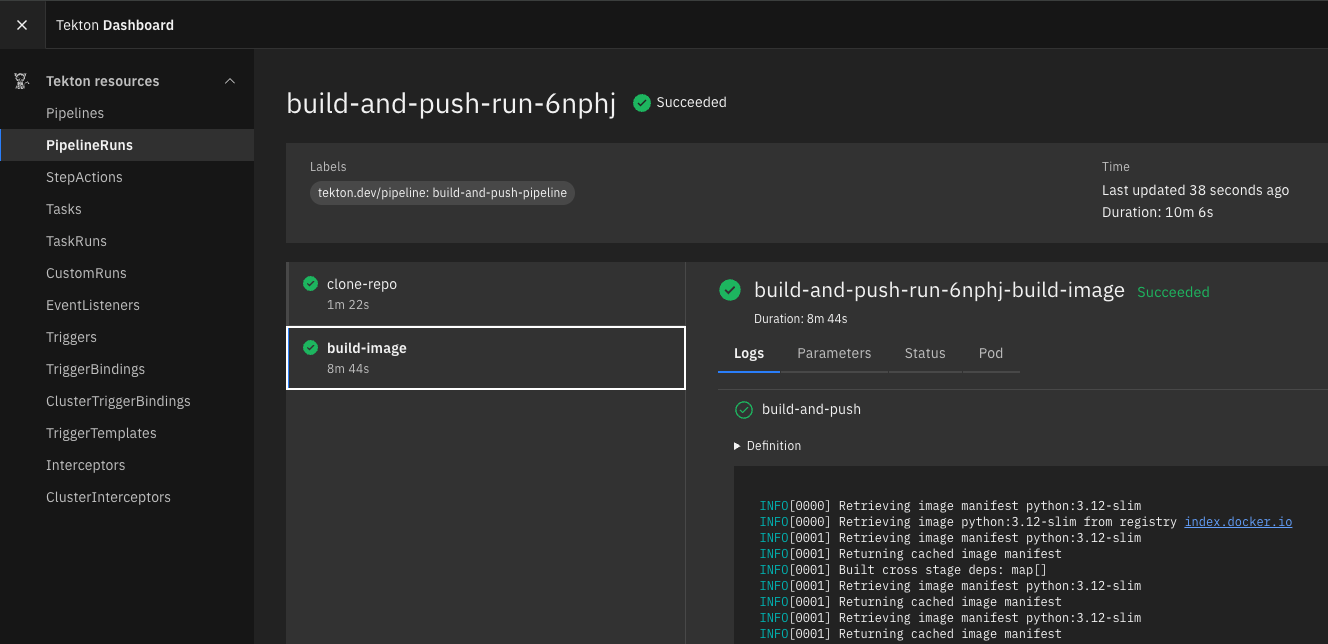
Observe the PipelineRun logs using
tkncommand or optionally in the Tekton dasboard (if it was deployed from the previous section)tkn pipelinerun logs -f --last [clone-repo : clone] Cloning into '/workspace/output/source'... [clone-repo : clone] Note: switching to '47e93d64cf9f788c00dfad0b8b27b79afffa4b88'. [clone-repo : clone] HEAD is now at 47e93d6 Add: adding tekton files [clone-repo : clone] Cloned https://github.com/_your_github_handle/app-source.git at 47e93d6 [build-image : build-and-push] INFO[0000] Retrieving image manifest python:3.12-slim [build-image : build-and-push] INFO[0000] Retrieving image python:3.12-slim from registry index.docker.io [build-image : build-and-push] INFO[0001] Retrieving image manifest python:3.12-slim [build-image : build-and-push] INFO[0001] Returning cached image manifest [build-image : build-and-push] INFO[0001] Built cross stage deps: map[] [build-image : build-and-push] INFO[0001] Retrieving image manifest python:3.12-slim [build-image : build-and-push] INFO[0001] Returning cached image manifest [build-image : build-and-push] INFO[0001] Retrieving image manifest python:3.12-slim [build-image : build-and-push] INFO[0001] Returning cached image manifest [build-image : build-and-push] INFO[0001] Executing 0 build triggers [build-image : build-and-push] INFO[0001] Building stage 'python:3.12-slim' [idx: '0', base-idx: '-1'] [build-image : build-and-push] INFO[0001] Checking for cached layer docker.io/_your_github_handle/app-source-cache:1e866e51d8b7c36f12c9de5a05920a7c9ba9213dcb0f6515a6f10e1ab82cbce4... [build-image : build-and-push] INFO[0002] Using caching version of cmd: RUN useradd -u 1001 -m appuser [build-image : build-and-push] INFO[0002] Checking for cached layer docker.io/_your_github_handle/app-source-cache:03666d67cb2e99a403af6ad31962c4787a1f197c53e33d087e12727b405a8a20... [build-image : build-and-push] INFO[0002] Using caching version of cmd: RUN pip install --no-cache-dir -r requirements.txt [build-image : build-and-push] INFO[0002] Cmd: USER [build-image : build-and-push] INFO[0002] Cmd: EXPOSE [build-image : build-and-push] INFO[0002] Adding exposed port: 8000/tcp [build-image : build-and-push] INFO[0002] Unpacking rootfs as cmd COPY requirements.txt . requires it. [build-image : build-and-push] INFO[0004] ARG APP_VERSION=dev [build-image : build-and-push] INFO[0004] No files changed in this command, skipping snapshotting. [build-image : build-and-push] INFO[0004] ARG GIT_SHA=dev [build-image : build-and-push] INFO[0004] No files changed in this command, skipping snapshotting. [build-image : build-and-push] INFO[0004] ARG BUILD_TIME=dev [build-image : build-and-push] INFO[0004] No files changed in this command, skipping snapshotting. [build-image : build-and-push] INFO[0004] ENV APP_VERSION=${APP_VERSION} GIT_SHA=${GIT_SHA} BUILD_TIME=${BUILD_TIME} [build-image : build-and-push] INFO[0004] No files changed in this command, skipping snapshotting. [build-image : build-and-push] INFO[0004] RUN useradd -u 1001 -m appuser [build-image : build-and-push] INFO[0004] Found cached layer, extracting to filesystem [build-image : build-and-push] INFO[0005] WORKDIR /app [build-image : build-and-push] INFO[0005] Cmd: workdir [build-image : build-and-push] INFO[0005] Changed working directory to /app [build-image : build-and-push] INFO[0005] Creating directory /app with uid -1 and gid -1 [build-image : build-and-push] INFO[0005] Taking snapshot of files... [build-image : build-and-push] INFO[0005] COPY requirements.txt . [build-image : build-and-push] INFO[0005] Taking snapshot of files... [build-image : build-and-push] INFO[0005] RUN pip install --no-cache-dir -r requirements.txt [build-image : build-and-push] INFO[0005] Found cached layer, extracting to filesystem [build-image : build-and-push] INFO[0007] COPY app.py . [build-image : build-and-push] INFO[0007] Taking snapshot of files... [build-image : build-and-push] INFO[0007] USER appuser [build-image : build-and-push] INFO[0007] Cmd: USER [build-image : build-and-push] INFO[0007] No files changed in this command, skipping snapshotting. [build-image : build-and-push] INFO[0007] EXPOSE 8000 [build-image : build-and-push] INFO[0007] Cmd: EXPOSE [build-image : build-and-push] INFO[0007] Adding exposed port: 8000/tcp [build-image : build-and-push] INFO[0007] No files changed in this command, skipping snapshotting. [build-image : build-and-push] INFO[0007] CMD ["uvicorn", "app:app", "--host", "0.0.0.0", "--port", "8000"] [build-image : build-and-push] INFO[0007] No files changed in this command, skipping snapshotting. [build-image : build-and-push] INFO[0007] Pushing image to docker.io/_your_github_handle/app-source:47e93d6 [build-image : build-and-push] INFO[0010] Pushed index.docker.io/_your_github_handle/app-source@sha256:ef8671bb7454711023109926ba29658e3fdac34f619168432f22f6974add7b2e [build-image : build-and-push] INFO[0010] Pushing image to docker.io/_your_github_handle/app-source:latest [build-image : build-and-push] INFO[0012] Pushed index.docker.io/_your_github_handle/app-source@sha256:ef8671bb7454711023109926ba29658e3fdac34f619168432f22f6974add7b2eTekton URL:
-
Confirm new image in Docker or Harbor registry that was chosen during initial Secret and ServiceAccount configuration in the Pre-requisites section.
-
Explore the details of the image around the image tag
Automated - Pipeline Run
In this section we will configure automation of Tekton PipelineRuns so it triggers as it detects every push to git repository.
-
Create a small change to the application source code and push to git hub
$ echo "# Testing first automated PipelineRun" >> app.py $ git add . $ git commit -am "Chore: Testing first automated PipelineRun" $ git push # [main 3338bbe] Chore: Testing first automated PipelineRun 1 file changed, 1 insertion(+) Enumerating objects: 5, done. Counting objects: 100% (5/5), done. Delta compression using up to 12 threads Compressing objects: 100% (3/3), done. Writing objects: 100% (3/3), 343 bytes | 343.00 KiB/s, done. Total 3 (delta 2), reused 0 (delta 0), pack-reused 0 remote: Resolving deltas: 100% (2/2), completed with 2 local objects. To https://github.com/_your_git_handle/app-source.git 47e93d6..3338bbe main -> main -
Check SMEE logs to see if the Webhook from Github has been pushed to
EventListener -
Observe the
PipelineRunlogs usingtkncommand$ tkn pipelinerun list # NAME STARTED DURATION STATUS build-triggered-5cft4 3 minutes ago 26s Succeeded build-triggered-b5lgd 10 minutes ago 25s Succeeded $ tkn pipelinerun logs -f --last # [clone-repo : clone] Cloning into '/workspace/output/source'... [clone-repo : clone] Note: switching to '3338bbe89277ea313014a258dec06bff60f2d3b8'. [clone-repo : clone] HEAD is now at 3338bbe Chore: Testing first automated PipelineRun # Successful clone [clone-repo : clone] Cloned https://github.com/_your_github_handle/app-source.git at 3338bbe [build-image : build-and-push] INFO[0000] Retrieving image manifest python:3.12-slim [build-image : build-and-push] INFO[0000] Retrieving image python:3.12-slim from registry index.docker.io [build-image : build-and-push] INFO[0001] Retrieving image manifest python:3.12-slim [build-image : build-and-push] INFO[0001] Returning cached image manifest [build-image : build-and-push] INFO[0001] Built cross stage deps: map[] [build-image : build-and-push] INFO[0001] Retrieving image manifest python:3.12-slim [build-image : build-and-push] INFO[0001] Returning cached image manifest [build-image : build-and-push] INFO[0001] Retrieving image manifest python:3.12-slim [build-image : build-and-push] INFO[0001] Returning cached image manifest [build-image : build-and-push] INFO[0001] Executing 0 build triggers [build-image : build-and-push] INFO[0001] Building stage 'python:3.12-slim' [idx: '0', base-idx: '-1'] [build-image : build-and-push] INFO[0001] Checking for cached layer docker.io/_your_github_handle/app-source-cache:1e866e51d8b7c36f12c9de5a05920a7c9ba9213dcb0f6515a6f10e1ab82cbce4... [build-image : build-and-push] INFO[0002] Using caching version of cmd: RUN useradd -u 1001 -m appuser [build-image : build-and-push] INFO[0002] Checking for cached layer docker.io/_your_github_handle/app-source-cache:03666d67cb2e99a403af6ad31962c4787a1f197c53e33d087e12727b405a8a20... [build-image : build-and-push] INFO[0002] Using caching version of cmd: RUN pip install --no-cache-dir -r requirements.txt [build-image : build-and-push] INFO[0002] Cmd: USER [build-image : build-and-push] INFO[0002] Cmd: EXPOSE [build-image : build-and-push] INFO[0002] Adding exposed port: 8000/tcp [build-image : build-and-push] INFO[0002] Unpacking rootfs as cmd COPY requirements.txt . requires it. [build-image : build-and-push] INFO[0004] ARG APP_VERSION=dev [build-image : build-and-push] INFO[0004] No files changed in this command, skipping snapshotting. [build-image : build-and-push] INFO[0004] ARG GIT_SHA=dev [build-image : build-and-push] INFO[0004] No files changed in this command, skipping snapshotting. [build-image : build-and-push] INFO[0004] ARG BUILD_TIME=dev [build-image : build-and-push] INFO[0004] No files changed in this command, skipping snapshotting. [build-image : build-and-push] INFO[0004] ENV APP_VERSION=${APP_VERSION} GIT_SHA=${GIT_SHA} BUILD_TIME=${BUILD_TIME} [build-image : build-and-push] INFO[0004] No files changed in this command, skipping snapshotting. [build-image : build-and-push] INFO[0004] RUN useradd -u 1001 -m appuser [build-image : build-and-push] INFO[0004] Found cached layer, extracting to filesystem [build-image : build-and-push] INFO[0005] WORKDIR /app [build-image : build-and-push] INFO[0005] Cmd: workdir [build-image : build-and-push] INFO[0005] Changed working directory to /app [build-image : build-and-push] INFO[0005] Creating directory /app with uid -1 and gid -1 [build-image : build-and-push] INFO[0005] Taking snapshot of files... [build-image : build-and-push] INFO[0005] COPY requirements.txt . [build-image : build-and-push] INFO[0005] Taking snapshot of files... [build-image : build-and-push] INFO[0005] RUN pip install --no-cache-dir -r requirements.txt [build-image : build-and-push] INFO[0005] Found cached layer, extracting to filesystem [build-image : build-and-push] INFO[0007] COPY app.py . [build-image : build-and-push] INFO[0007] Taking snapshot of files... [build-image : build-and-push] INFO[0007] USER appuser [build-image : build-and-push] INFO[0007] Cmd: USER [build-image : build-and-push] INFO[0007] No files changed in this command, skipping snapshotting. [build-image : build-and-push] INFO[0007] EXPOSE 8000 [build-image : build-and-push] INFO[0007] Cmd: EXPOSE [build-image : build-and-push] INFO[0007] Adding exposed port: 8000/tcp [build-image : build-and-push] INFO[0007] No files changed in this command, skipping snapshotting. [build-image : build-and-push] INFO[0007] CMD ["uvicorn", "app:app", "--host", "0.0.0.0", "--port", "8000"] [build-image : build-and-push] INFO[0007] No files changed in this command, skipping snapshotting. [build-image : build-and-push] INFO[0007] Pushing image to docker.io/_your_github_handle/app-source:3338bbe [build-image : build-and-push] INFO[0010] Pushed index.docker.io/_your_github_handle/app-source@sha256:0a124f7d5e7d33dff90ab8f6c0bb5bb84a6c0bc75ce2d7a689a3579aab35c0c7 [build-image : build-and-push] INFO[0010] Pushing image to docker.io/_your_github_handle/app-source:latest # Successful push to container registry [build-image : build-and-push] INFO[0012] Pushed index.docker.io/_your_github_handle/app-source@sha256:0a124f7d5e7d33dff90ab8f6c0bb5bb84a6c0bc75ce2d7a689a3579aab35c0c7 -
Confirm new image in Docker or Harbor registry that was chosen during initial Secret and ServiceAccount configuration in the Pre-requisites section.
-
Explore the details of the image around the image tag
We will proceed with Continuous Deployment (CD) of the sample application in the next section using Flux CD.