Deploying Nutanix Enterprise AI (NAI) NVD Reference Application
Version 2.7.0
This version of the NAI deployment is based on the Nutanix Enterprise AI (NAI) v2.7.0 release.
stateDiagram-v2
    direction LR

    state DeployNAI {
        [*] --> DeployNAIAdmin
        DeployNAIAdmin -->  InstallSSLCert
        InstallSSLCert --> DownloadModel
        DownloadModel --> CreateNAI
        CreateNAI --> [*]
    }

    [*] --> PreRequisites
    PreRequisites --> DeployNAI
    DeployNAI --> TestNAI : next section
    TestNAI --> [*]
Prepare for NAI Deployment
GA Software with NAI v2.7.0
In this lab, we will deploy GA version of the following software to test the following:
-
Nutanix Enterprise AI
- Unified Endpoints - multiple endpoints for HA and token-based rate limiting
- Providers - Add remote endpoints from providers to utilize their models in Nutanix Enterprise AI workloads.
Info
Changes in NAI v2.7.0
- Kserve is of at least of
v0.15.0 - Cert-manager is at least of
v1.17.2 - OpenTelemetry operator is at least of
v0.102.0 - Envoy Gateway is at least of
v1.7.0 - Prometheus Monitoring is at least of
78.4.0
Enable Pre-requisite Applications
Enable Pre-requisite Applications
Warning
Make sure to license NKP cluster with at least NKP Pro License to make use of the NKP Applications catalog to provision NAI (and other applications)
Prometheus
The following pre-requisite applications will be enabled on NKP GUI:
Note
In this lab, we will be using the Management Cluster Workspace to deploy our Nutanix Enterprise AI (NAI)
However, in a customer environment, it is recommended to use a separate workload NKP cluster.
Search and Enable the following applications: follow this order to install dependencies for NAI application
- In the NKP GUI, Go to Clusters
- Click on Management Cluster Workspace
-
Go to Applications to search and enable the following:
- Prometheus Monitoring : version
78.4.0or higher with the followingValuesconfiguration
- Prometheus Monitoring : version
-
Wait for
Deployedstate in the GUI
Cert Manager
Cert Manager is pre-installed on all NKP Clusters. If not installed, use the following method to install:
- In the NKP GUI, Go to Clusters
- Click on Management Cluster Workspace
-
Go to Applications to search and enable the following:
- Cert-manager-
v1.17.2
- Cert-manager-
-
Wait for
Deployedstate in the GUI
Envoy Gateway
-
Login to VSC on the jumphost VM, append the following environment variables to the
$HOME\airgap-nai\.envfile and save itexport NAI_USER=_your_desired_nai_ui_username export NAI_TEMP_PASS=_your_desired_nai_ui_password # At least 8 characters export REGISTRY=_your_private_registry export REGISTRY_USERNAME=admin export REGISTRY_PASSWORD=_your_private_registry_password export REGISTRY_EMAIL=admin export IMAGE_PULL_SECRET=_your_desired_pull_secret_name -
IN VSC,go to Terminal and run the following commands to source the environment variables
-
Create Kubernetes namespaces and docker-registry secrets for Envoy Gateway System
-
Enable Envoy Gateway CRDs
v1.7.0in AI gateway modePulled: harbor.x.x.x.x.nip.io/nutanix/gateway-crds-helm:v1.7.0 Digest: sha256:625ee2409826d30e70ac26eb1a93e80650ba2c81464f65aaca6968cd33793b37 customresourcedefinition.apiextensions.k8s.io/backendtlspolicies.gateway.networking.k8s.io serverside-applied customresourcedefinition.apiextensions.k8s.io/gatewayclasses.gateway.networking.k8s.io serverside-applied customresourcedefinition.apiextensions.k8s.io/gateways.gateway.networking.k8s.io serverside-applied customresourcedefinition.apiextensions.k8s.io/grpcroutes.gateway.networking.k8s.io serverside-applied customresourcedefinition.apiextensions.k8s.io/httproutes.gateway.networking.k8s.io serverside-applied customresourcedefinition.apiextensions.k8s.io/referencegrants.gateway.networking.k8s.io serverside-applied customresourcedefinition.apiextensions.k8s.io/tcproutes.gateway.networking.k8s.io serverside-applied customresourcedefinition.apiextensions.k8s.io/tlsroutes.gateway.networking.k8s.io serverside-applied customresourcedefinition.apiextensions.k8s.io/udproutes.gateway.networking.k8s.io serverside-applied customresourcedefinition.apiextensions.k8s.io/xbackendtrafficpolicies.gateway.networking.x-k8s.io serverside-applied customresourcedefinition.apiextensions.k8s.io/xlistenersets.gateway.networking.x-k8s.io serverside-applied customresourcedefinition.apiextensions.k8s.io/xmeshes.gateway.networking.x-k8s.io serverside-applied customresourcedefinition.apiextensions.k8s.io/backends.gateway.envoyproxy.io serverside-applied customresourcedefinition.apiextensions.k8s.io/backendtrafficpolicies.gateway.envoyproxy.io serverside-applied customresourcedefinition.apiextensions.k8s.io/clienttrafficpolicies.gateway.envoyproxy.io serverside-applied customresourcedefinition.apiextensions.k8s.io/envoyextensionpolicies.gateway.envoyproxy.io serverside-applied customresourcedefinition.apiextensions.k8s.io/envoypatchpolicies.gateway.envoyproxy.io serverside-applied customresourcedefinition.apiextensions.k8s.io/envoyproxies.gateway.envoyproxy.io serverside-applied customresourcedefinition.apiextensions.k8s.io/httproutefilters.gateway.envoyproxy.io serverside-applied customresourcedefinition.apiextensions.k8s.io/securitypolicies.gateway.envoyproxy.io serverside-applied -
Prepare values file for configuring advanced features for envoy gateway in AI gateway mode.
cat << EOF > eg-config-for-gateway-mode.yaml # This file configures Envoy Gateway for AI Gateway mode with rate limiting config: envoyGateway: gateway: controllerName: "gateway.envoyproxy.io/gatewayclass-controller" logging: level: default: "info" provider: kubernetes: rateLimitDeployment: container: image: "${REGISTRY}/${PROJECT}/nai-ratelimit:99d85510" patch: type: "StrategicMerge" value: spec: template: spec: containers: - imagePullPolicy: "IfNotPresent" name: "envoy-ratelimit" image: "${REGISTRY}/${PROJECT}/nai-ratelimit:99d85510" type: "Kubernetes" extensionApis: enableEnvoyPatchPolicy: true enableBackend: true extensionManager: maxMessageSize: 11Mi backendResources: - group: inference.networking.k8s.io kind: InferencePool version: v1 hooks: xdsTranslator: translation: listener: includeAll: true route: includeAll: true cluster: includeAll: true secret: includeAll: true post: - "Translation" - "Cluster" - "Route" service: fqdn: hostname: "ai-gateway-controller.nai-system.svc.cluster.local" port: 1063 rateLimit: backend: type: "Redis" redis: url: "redis-sentinel.nai-system.svc.cluster.local:6379" EOF -
Enable Envoy Gateway
v1.7.0in AI gateway modehelm upgrade --install eg oci://${REGISTRY}/${PROJECT}/gateway-helm \ --version v1.7.0 \ -n envoy-gateway-system \ --create-namespace --wait \ --set global.images.envoyGateway.image=${REGISTRY}/${PROJECT}/nai-gateway:v1.7.0 \ --set global.images.ratelimit.image=${REGISTRY}/${PROJECT}/nai-ratelimit:99d85510 \ --set "global.imagePullSecrets[0].name=${IMAGE_PULL_SECRET}" \ -f ./eg-config-for-gateway-mode.yamlhelm upgrade --install eg oci://harbor.10.x.x.x.nip.io/nutanix/gateway-helm \ --version v1.7.0 \ -n envoy-gateway-system \ --create-namespace --wait \ --set global.images.envoyGateway.image=harbor.10.x.x.x.nip.io/nutanix/nai-gateway:v1.7.0 \ --set global.images.ratelimit.image=harbor.10.x.x.x.nip.io/nutanix/nai-ratelimit:99d85510 \ --set global.imagePullSecrets[0].name=private-regcred \ -f ./eg-config-for-gateway-mode.yamlRelease "eg" does not exist. Installing it now. Pulled: harbor.x.x.x.x.nip.io/nutanix/gateway-helm:v1.7.0 Digest: sha256:80ce6293c5a8658897971cd10adef51880a3ee6e5e1bbc92415b943cd4b94cb5 NAME: eg LAST DEPLOYED: Tue Jun 2 06:50:14 2026 NAMESPACE: envoy-gateway-system STATUS: deployed REVISION: 1 DESCRIPTION: Install complete TEST SUITE: None -
Check if Envoy Gateway resources are ready
Warning
The
envoy-ratelimit-pod will temporarily be inCrashLoopBackOffstate and eventually will transition toRunningafter redis-standalone pod is fully deployed in the upcoming Deploy NAI section.Ignore the
CrashLoopBackOffstate for now and move on to the next section.$ kubectl wait --timeout=5m -n envoy-gateway-system deployment/envoy-gateway --for=condition=Available # deployment.apps/envoy-gateway condition met $ kubectl get pods # NAME READY STATUS RESTARTS AGE envoy-gateway-c885698c5-f88wl 1/1 Running 0 102s envoy-ratelimit-7c47dd84cc-8qz7n 0/1 Error 4 (48s ago) 101s
Kserve
-
Create kubernetes namespaces and docker-registry secrets for KServe
-
Run the Kserve CRD installation
Pulled: harbor.x.x.x.x.nip.io/nutanix/kserve-crd:v0.15.0 Digest: sha256:b673a75fdf45602ae58bb528e7b445e4530617b18f8eebb5d6337c16d4596951 Release "kserve-crd" has been upgraded. Happy Helming! NAME: kserve-crd LAST DEPLOYED: Tue Jun 2 07:03:11 2026 NAMESPACE: kserve STATUS: deployed REVISION: 2 DESCRIPTION: Upgrade complete TEST SUITE: None -
Run the Kserve installation
helm upgrade --install kserve \
  oci://${REGISTRY}/${PROJECT}/kserve \
  --version v0.15.0 \
  -n kserve --wait \
  --set kserve.controller.deploymentMode=RawDeployment \
  --set kserve.controller.gateway.disableIngressCreation=true \
  --set kserve.controller.image=${REGISTRY}/${PROJECT}/nai-kserve-controller \
  --set kserve.controller.rbacProxyImage=${REGISTRY}/${PROJECT}/nai-kube-rbac-proxy:v0.18.0 \
  --set kserve.controller.imagePullSecrets[0].name=${IMAGE_PULL_SECRET}
helm upgrade --install kserve \ oci://harbor.10.x.x.x.nip.io/kserve \ --version v0.15.0 \ -n kserve --wait \ --set kserve.controller.deploymentMode=RawDeployment \ --set kserve.controller.gateway.disableIngressCreation=true \ --set kserve.controller.image=${REGISTRY}/${PROJECT}/nai-kserve-controller \ --set kserve.controller.rbacProxyImage=${REGISTRY}/${PROJECT}/nai-kube-rbac-proxy:v0.18.0 \ --set kserve.controller.imagePullSecrets[0].name=${IMAGE_PULL_SECRET}Pulled: harbor.x.x.x.x.nip.io/nutanix/kserve:v0.15.0 Digest: sha256:e1bc365c75dd28f0c43581107b78614ffe21e6fbaf95a9351af440d3eec45130 Release "kserve" has been upgraded. Happy Helming! NAME: kserve LAST DEPLOYED: Tue Jun 2 07:08:10 2026 NAMESPACE: kserve STATUS: deployed REVISION: 2 DESCRIPTION: Upgrade completeKserve install failure?
Ocassionally the Kserve install might fail due to webhook race condition. If this happens, wait a few minutes and run the
helm update --install kserve ...commmand from above once again. -
Confirm if kserve pod is running
OpenTelemetry
-
Create kubernetes namespaces and docker-registry secrets for OpenTelemetry
-
Run the OpenTelemetry operator installation
helm upgrade --install opentelemetry-operator oci://${REGISTRY}/${PROJECT}/opentelemetry-operator \
  --version 0.102.0 \
  -n opentelemetry --create-namespace --wait \
  --set manager.image.repository=${REGISTRY}/${PROJECT}/nai-opentelemetry-operator \
  --set manager.collectorImage.repository=${REGISTRY}/${PROJECT}/nai-opentelemetry-collector-contrib \
  --set kubeRBACProxy.image.repository=${REGISTRY}/${PROJECT}/nai-kube-rbac-proxy \
  --set imagePullSecrets[0].name=${IMAGE_PULL_SECRET}
helm upgrade --install opentelemetry-operator oci://harbor.10.x.x.134.nip.io/nutanix/opentelemetry-operator \ --version 0.102.0 \ -n opentelemetry --create-namespace --wait \ --set manager.image.repository=harbor.10.x.x.134.nip.io/nutanix/nai-opentelemetry-operator \ --set manager.collectorImage.repository=harbor.10.x.x.134.nip.io/nutanix/nai-opentelemetry-collector-k8s \ --set kubeRBACProxy.image.repository=harbor.10.x.x.134.nip.io/nutanix/nai-kube-rbac-proxy --set imagePullSecrets[0].name=private-regcredPulled: harbor.x.x.x.x.nip.io/nutanix/opentelemetry-operator:0.102.0 Digest: sha256:bb3a48aeca0320a5c999b3849619e2d692eeec8ce59a6c43ca965c1fd1ffdb24 I0602 07:18:04.217343 1235342 warnings.go:107] "Warning: spec.privateKey.rotationPolicy: In cert-manager >= v1.18.0, the default value changed from `Never` to `Always`." NAME: opentelemetry-operator LAST DEPLOYED: Tue Jun 2 07:18:02 2026 NAMESPACE: opentelemetry STATUS: deployed REVISION: 1 DESCRIPTION: Install complete -
Confirm if Opentelemetry pod is running
Deploy NAI
-
Append the following environment variables to the
$HOME\airgap-nai\.envfile and save itexport NAI_API_RWX_STORAGECLASS=_desired_rwx_files_storageclass_created_in_previous_section export NAI_DEFAULT_RWO_STORAGECLASS=_desired_rwo_volume_storageclass export NKP_WORKSPACE_NAMESPACE=_desired_nkp_workspace # (1)!-
Get the values for the NKP workspace using the following commands:
nkp get workspaces
# Get the names of workspaces
# NAME                    NAMESPACE
# default-workspace       kommander-default-workspace
# kommander-workspace     kommander

nkp get clusters -w kommander-workspace
# Ensure the target cluster is in the correct workspace
# WORKSPACE               NAME            KUBECONFIG                              STATUS
# kommander-workspace     host-cluster    kommander-self-attach-kubeconfig        Joined
-
-
Source the environment variables (if not done so already)
-
Create kubernetes namespaces and docker-registry secrets for NAI
-
In
VSCodeExplorer pane, browse to$HOME/airgap-naifolder -
Run the following command to create a helm values file:
cat <<EOF > darksite-nai-operators.yaml global: imagePullSecrets: - name: ${IMAGE_PULL_SECRET} naiRedis: naiRedisImage: name: ${REGISTRY}/${PROJECT}/nai-redis naiJobs: naiJobsImage: image: ${REGISTRY}/${PROJECT}/nai-jobs nai-clickhouse-operator: operator: image: registry: ${REGISTRY} repository: ${PROJECT}/nai-clickhouse-operator metrics: image: registry: ${REGISTRY} repository: ${PROJECT}/nai-clickhouse-metrics-exporter ai-gateway-helm: extProc: image: repository: ${REGISTRY}/${PROJECT}/nai-ai-gateway-extproc controller: image: repository: ${REGISTRY}/${PROJECT}/nai-ai-gateway-controller EOFglobal: imagePullSecrets: - name: private-regcred naiRedis: naiRedisImage: name: harbor.10.x.x.134.nip.io/nutanix/nai-redis naiJobs: naiJobsImage: image: harbor.10.x.x.134.nip.io/nutanix/nai-jobs nai-clickhouse-operator: operator: image: registry: harbor.10.x.x.134.nip.io repository: nutanix/nai-clickhouse-operator metrics: image: registry: harbor.10.x.x.134.nip.io repository: nutanix/nai-clickhouse-metrics-exporter ai-gateway-helm: extProc: image: repository: harbor.10.x.x.134.nip.io/nutanix/nai-ai-gateway-extproc controller: image: repository: harbor.10.x.x.134.nip.io/nutanix/nai-ai-gateway-controller -
Install nai-operators helm chart in the nai-system namespace
Release "nai-operators" does not exist. Installing it now. Pulled: harbor.x.x.x.x.nip.io/nutanix/nai-operators:2.7.0 Digest: sha256:8a377a20f58f28500daab57730cf71bc4c7e2385615e061a9bd98e73ed47a978 I0602 07:33:51.855835 1236713 warnings.go:107] "Warning: spec.template.spec.containers[1].ports[0]: duplicate port name \"metrics\" with spec.template.spec.containers[0].ports[0], services and probes that select ports by name will use spec.template.spec.containers[0].ports[0]" I0602 07:33:51.875877 1236713 warnings.go:107] "Warning: spec.privateKey.rotationPolicy: In cert-manager >= v1.18.0, the default value changed from `Never` to `Always`." NAME: nai-operators LAST DEPLOYED: Tue Jun 2 07:33:50 2026 NAMESPACE: nai-system STATUS: deployed REVISION: 1 DESCRIPTION: Install complete TEST SUITE: None -
Verify all three nai-operator pods are running. Note that
ai-gateway-controller-pod is also running as we are installing AI Gateway features -
Run the following command to create a helm values file:
cat <<EOF > darksite-nai-core.yaml global: imagePullSecrets: - name: ${IMAGE_PULL_SECRET} storage: storageClassName: ${NAI_DEFAULT_RWO_STORAGECLASS} storageClassNameRWX: ${NAI_API_RWX_STORAGECLASS} gateway: envoyDeployment: container: image: ${REGISTRY}/${PROJECT}/nai-envoy:distroless-v1.37.0 naiIepOperator: iepOperatorImage: image: ${REGISTRY}/${PROJECT}/nai-iep-operator modelProcessorImage: image: ${REGISTRY}/${PROJECT}/nai-python-processor dataSourceProcessorImage: image: ${REGISTRY}/${PROJECT}/nai-python-processor batchInferenceProcessor: containers: processor: image: ${REGISTRY}/${PROJECT}/nai-go-processor statusProvider: image: ${REGISTRY}/${PROJECT}/nai-go-processor finetuneProcessorImage: image: ${REGISTRY}/${PROJECT}/nai-finetuning naiInferenceUi: naiUiImage: image: ${REGISTRY}/${PROJECT}/nai-inference-ui naiJobs: naiJobsImage: image: ${REGISTRY}/${PROJECT}/nai-jobs naiApi: naiApiImage: image: ${REGISTRY}/${PROJECT}/nai-api supportedTGIImage: ${REGISTRY}/${PROJECT}/nai-tgi supportedKserveRuntimeImage: ${REGISTRY}/${PROJECT}/nai-kserve-huggingfaceserver eppImage: ${REGISTRY}/${PROJECT}/nai-epp-inference-scheduler supportedVLLMImage: ${REGISTRY}/${PROJECT}/nai-vllm supportedKserveCustomModelServerRuntimeImage: ${REGISTRY}/${PROJECT}/nai-kserve-custom-model-server superAdmin: username: ${NAI_USER} password: ${NAI_TEMP_PASS} # At least 8 characters # email: admin@nutanix.com # firstName: admin naiDatabase: naiDbImage: image: ${REGISTRY}/${PROJECT}/nai-postgres:16.13-alpine naiIam: iamProxy: image: ${REGISTRY}/${PROJECT}/nai-iam-proxy iamProxyControlPlane: image: ${REGISTRY}/${PROJECT}/nai-iam-proxy-control-plane iamUi: image: ${REGISTRY}/${PROJECT}/nai-iam-ui iamUserAuthn: image: ${REGISTRY}/${PROJECT}/nai-iam-user-authn iamThemis: image: ${REGISTRY}/${PROJECT}/nai-iam-themis iamThemisBootstrap: image: ${REGISTRY}/${PROJECT}/nai-iam-bootstrap naiLabs: labsImage: image: ${REGISTRY}/${PROJECT}/nai-rag-app nai-clickhouse-keeper: clickhouseKeeper: image: registry: ${REGISTRY} repository: ${PROJECT}/nai-clickhouse-keeper oauth2-proxy: image: repository: ${REGISTRY}/${PROJECT}/nai-oauth2-proxy nai-clickhouse-server: clickhouse: image: registry: ${REGISTRY} repository: ${PROJECT}/nai-clickhouse-server initContainers: addUdf: image: registry: ${REGISTRY} repository: ${PROJECT}/nai-clickhouse-udf waitForKeeper: image: registry: ${REGISTRY} repository: ${PROJECT}/nai-jobs nai-clickhouse-schemas: image: registry: ${REGISTRY} repository: ${PROJECT}/nai-clickhouse-schemas naiAgent: agentImage: image: ${REGISTRY}/${PROJECT}/nai-agent-app naiMonitoring: opentelemetry: collectorImage: ${REGISTRY}/${PROJECT}/nai-opentelemetry-collector-contrib:0.141.0 targetAllocator: image: repository: ${REGISTRY}/${PROJECT}/nai-target-allocator nodeExporter: serviceMonitor: namespaceSelector: matchNames: - prometheus - kommander - kommander-default-workspace - ${NKP_WORKSPACE_NAMESPACE} dcgmExporter: serviceMonitor: namespaceSelector: matchNames: - prometheus - kommander - kommander-default-workspace - ${NKP_WORKSPACE_NAMESPACE} EOFglobal: imagePullSecrets: - name: private-regcred storage: storageClassName: nutanix-volume storageClassNameRWX: nai-nfs-storage gateway: envoyDeployment: container: image: harbor.10.x.x.134.nip.io/nutanix/nai-envoy:distroless-v1.37.0 naiIepOperator: iepOperatorImage: image: harbor.10.x.x.134.nip.io/nutanix/nai-iep-operator modelProcessorImage: image: harbor.10.x.x.134.nip.io/nutanix/nai-python-processor dataSourceProcessorImage: image: harbor.10.x.x.134.nip.io/nutanix/nai-python-processor batchInferenceProcessor: containers: processor: image: harbor.10.x.x.134.nip.io/nutanix/nai-go-processor statusProvider: image: harbor.10.x.x.134.nip.io/nutanix/nai-go-processor finetuneProcessorImage: image: harbor.10.x.x.134.nip.io/nutanix/nai-finetuning naiInferenceUi: naiUiImage: image: harbor.10.x.x.134.nip.io/nutanix/nai-inference-ui naiJobs: naiJobsImage: image: harbor.10.x.x.134.nip.io/nutanix/nai-jobs naiApi: naiApiImage: image: harbor.10.x.x.134.nip.io/nutanix/nai-api supportedTGIImage: harbor.10.x.x.134.nip.io/nutanix/nai-tgi supportedKserveRuntimeImage: harbor.10.x.x.134.nip.io/nutanix/nai-kserve-huggingfaceserver eppImage: harbor.10.x.x.134.nip.io/nutanix/nai-epp-inference-scheduler supportedVLLMImage: harbor.10.x.x.134.nip.io/nutanix/nai-vllm supportedKserveCustomModelServerRuntimeImage: harbor.10.x.x.134.nip.io/nutanix/nai-kserve-custom-model-server superAdmin: username: admin password: xxxxxxx # At least 8 characters # email: admin@nutanix.com # firstName: admin naiDatabase: naiDbImage: image: harbor.10.x.x.134.nip.io/nutanix/nai-postgres:16.13-alpine naiIam: iamProxy: image: harbor.10.x.x.134.nip.io/nutanix/nai-iam-proxy iamProxyControlPlane: image: harbor.10.x.x.134.nip.io/nutanix/nai-iam-proxy-control-plane iamUi: image: harbor.10.x.x.134.nip.io/nutanix/nai-iam-ui iamUserAuthn: image: harbor.10.x.x.134.nip.io/nutanix/nai-iam-user-authn iamThemis: image: harbor.10.x.x.134.nip.io/nutanix/nai-iam-themis iamThemisBootstrap: image: harbor.10.x.x.134.nip.io/nutanix/nai-iam-bootstrap naiLabs: labsImage: image: harbor.10.x.x.134.nip.io/nutanix/nai-rag-app nai-clickhouse-keeper: clickhouseKeeper: image: registry: harbor.10.x.x.134.nip.io repository: nutanix/nai-clickhouse-keeper oauth2-proxy: image: repository: harbor.10.x.x.134.nip.io/nutanix/nai-oauth2-proxy nai-clickhouse-server: clickhouse: image: registry: harbor.10.x.x.134.nip.io repository: nutanix/nai-clickhouse-server initContainers: addUdf: image: registry: harbor.10.x.x.134.nip.io repository: nutanix/nai-clickhouse-udf waitForKeeper: image: registry: harbor.10.x.x.134.nip.io repository: nutanix/nai-jobs nai-clickhouse-schemas: image: registry: harbor.10.x.x.134.nip.io repository: nutanix/nai-clickhouse-schemas naiAgent: agentImage: image: harbor.10.x.x.134.nip.io/nutanix/nai-agent-app naiMonitoring: opentelemetry: collectorImage: harbor.10.x.x.134.nip.io/nutanix/nai-opentelemetry-collector-contrib:0.141.0 targetAllocator: image: repository: harbor.10.x.x.134.nip.io/nutanix/nai-target-allocator nodeExporter: serviceMonitor: namespaceSelector: matchNames: - prometheus - kommander - kommander-default-workspace - kommander dcgmExporter: serviceMonitor: namespaceSelector: matchNames: - prometheus - kommander - kommander-default-workspace - kommander -
Install NAI Core helm chart in the nai-system namespace
-
Check if all NAI core pods are running
Active namespace is "nai-system".

NAME                                                    READY   STATUS      RESTARTS        AGE
ai-gateway-controller-77d6cb4764-h2jfs                  1/1     Running     0               17h
chi-nai-clickhouse-server-chcluster1-0-0-0              1/1     Running     0               4m30s
chk-nai-clickhouse-keeper-chkeeper-0-0-0                1/1     Running     0               4m14s
iam-database-bootstrap-awoad-cwxqf                      0/1     Completed   0               4m45s
iam-proxy-8fcc9599c-xggpz                               1/1     Running     0               4m45s
iam-proxy-control-plane-54489f7bf7-h8xqz                1/1     Running     0               4m45s
iam-themis-7f65594f9d-z8krt                             1/1     Running     0               4m44s
iam-themis-bootstrap-1grir-k7kst                        0/1     Completed   0               4m45s
iam-ui-5bf8747f4-hbnmb                                  1/1     Running     0               4m45s
iam-user-authn-676df76bc5-j6b8v                         1/1     Running     0               4m45s
nai-agent-6db7856f5f-6z947                              1/1     Running     0               4m45s
nai-api-cffbdf967-kllbj                                 1/1     Running     2 (2m29s ago)   4m45s
nai-api-db-migrate-nv7cs-8gz2r                          0/1     Completed   4               4m45s
nai-clickhouse-schema-job-1780450736-p4kxd              0/1     Completed   0               4m45s
nai-db-0                                                1/1     Running     0               4m45s
nai-iep-model-controller-5468d4844f-jfcsl               1/1     Running     0               4m45s
nai-oauth2-proxy-744f8d6c56-kbvnb                       1/1     Running     0               4m45s
nai-operators-nai-clickhouse-operator-86d684894-7jsbw   2/2     Running     0               17h
nai-otel-collector-collector-5ftxs                      1/1     Running     0               4m43s
nai-otel-collector-collector-flf9z                      1/1     Running     0               4m43s
nai-otel-collector-collector-fmcz6                      1/1     Running     0               4m43s
nai-otel-collector-collector-fz47d                      1/1     Running     0               4m43s
nai-otel-collector-collector-k7s2g                      1/1     Running     0               4m43s
nai-otel-collector-collector-l6dj4                      1/1     Running     0               4m43s
nai-otel-collector-collector-rxzmw                      1/1     Running     0               4m43s
nai-otel-collector-targetallocator-d85875d76-cvlzl      1/1     Running     0               4m43s
nai-securityscan-manager-6b7589cbbb-5w7v7               1/1     Running     3 (4m21s ago)   4m45s
nai-ui-c99b9dcd5-b7lzv                                  1/1     Running     0               4m45s
redis-standalone-67d4865578-47pm6                       2/2     Running     0               17h
Install SSL Certificate and Gateway Elements
In this section we will install SSL Certificate to access the NAI UI. This is required as the endpoint will only work with a ssl endpoint with a valid certificate.
NAI UI is accessible using the Envoy Ingress Gateway.
Optional and manual - using Public Certificate Authority (CA)
If an organization generates certificates using a different mechanism then obtain the certificate + key and create a kubernetes secret manually using the following command:
-
Create the certificate from the files (generated using certbot or provided to you)
-
Combine the certificates to get the certificate bundle
-
Create a kubernetes secret in the nai-system namespace to use during NAI install
-
Patch the Envoy gateway with the
nai-certcertificate details
Optional to automate - using Public Certificate Authority (CA) and Cert Manager
Using Cert Manager to manage the Public Certificate Authority (CA) for NAI SSL Certificate is also a possiblity.
At a high level (Cloudflare Example):
- Get a API key from DNS provider woth Edit Zone rights
-
Create a Kubernetes
Secretfrom the API key -
Create a
ClusterIssuerwith Cert Mangager/Let's Encrypt - Configure cert-manager to use DNS-01 challenge with Cloudflare for automatic certificate issuance.apiVersion: cert-manager.io/v1 kind: ClusterIssuer metadata: name: letsencrypt-cloudflare namespace: cert-manager spec: acme: email: _YOUR_DOMAIN_OWNER_EMAIL_ADDRESS server: https://acme-v02.api.letsencrypt.org/directory privateKeySecretRef: name: letsencrypt-cloudflare-account-key solvers: - dns01: cloudflare: apiTokenSecretRef: name: cloudflare-api-token-secret key: api-tokenapiVersion: cert-manager.io/v1 kind: ClusterIssuer metadata: name: letsencrypt-cloudflare spec: acme: email: _YOUR_DOMAIN_OWNER_EMAIL_ADDRESS server: https://acme-v02.api.letsencrypt.org/directory privateKeySecretRef: name: nai-letsencrypt-cluster solvers: - dns01: route53: region: us-east-1 accessKeyIDSecretRef: name: route53-api-token-secret key: access-key-id secretAccessKeySecretRef: name: route53-api-token-secret key: secret-access-key hostedZoneID: _HOSTED_ZONE_ID -
Create the ingress resource certificate using the following command:
-
Patch the Envoy gateway with the
nai-certcertificate details
The following steps show how cert-manager can be used to generate a self signed certificate using the default selfsigned-issuer present in the cluster for the purposes of the lab.
-
Get the NAI UI ingress gateway host using the following command:
-
Get the value of
NAI_UI_ENDPOINTenvironment variable -
We will use the command output e.g:
10.x.x.216as the IP address for NAI as reserved in this section -
Construct the FQDN of NAI UI using nip.io and we will use this FQDN as the certificate's Common Name (CN).
-
Create the ingress resource certificate using the following command:
cat << EOF | k apply -f - apiVersion: cert-manager.io/v1 kind: Certificate metadata: name: nai-cert namespace: nai-system spec: issuerRef: name: selfsigned-issuer kind: ClusterIssuer secretName: nai-cert commonName: nai.${NAI_UI_ENDPOINT}.nip.io dnsNames: - nai.${NAI_UI_ENDPOINT}.nip.io ipAddresses: - ${NAI_UI_ENDPOINT} EOF -
Patch the Envoy gateway with the
nai-certcertificate details -
Create EnvoyProxy
-
Patch the
nai-ingress-gatewayresource with the newEnvoyProxydetails
Accessing the UI
-
In a browser, open the following URL to connect to the NAI UI
-
Use the
${NAI_USER}and${NAI_TEMP_PASS}values set in${ENVIRONMENT}-values.yamlfiles duringhelminstallation of NAIv.2.4.0 -
Change the password for the
adminuser -
Login using
adminuser and password.
Download Model
We will download and user llama3 8B model which we sized for in the previous section.
We will use the model already downloaded to /model_share from our jumphost in this section.
- In the NAI GUI, go to Models
- Click on Import Model from Hugging Face
- Select the Manual Import method
-
Choose the
meta-llama/Meta-Llama-3.1-8B-Instructmodel -
Provide the Model Instance Name as
Meta-Llama-3.1-8B-Instructand click Import -
Choose the following:
- Location - File Share
- File Server Address -
labFS.ntnxlab.local(point to your File server FQDN) - NFS Export Path-
/model_share - Directory Parth for the Model -
Meta-Llama-3.1-8B-Instruct(this is the folder created by the model download script)
-
Go to VSC Terminal to monitor the download
Get jobs in nai-admin namespacekubens nai-admin ✔ Active namespace is "nai-admin" kubectl get jobs NAME COMPLETIONS DURATION AGE nai-c0d6ca61-1629-43d2-b57a-9f-model-job 0/1 4m56s 4m56Validate creation of pods and PVCkubectl get po,pvc NAME READY STATUS RESTARTS AGE nai-c0d6ca61-1629-43d2-b57a-9f-model-job-9nmff 1/1 Running 0 4m49s NAME STATUS VOLUME CAPACITY ACCESS MODES STORAGECLASS VOLUMEATTRIBUTESCLASS AGE nai-c0d6ca61-1629-43d2-b57a-9f-pvc-claim Bound pvc-a63d27a4-2541-4293-b680-514b8b890fe0 28Gi RWX nai-nfs-storage <unset> 2dVerify download of model using pod logskubectl logs -f nai-c0d6ca61-1629-43d2-b57a-9f-model-job-9nmff [Entrypoint] Downloading Model from Hugging Face NAI Monitor: Downloaded directory size: 0.00MB The new directory is created! - /data/model-files NAI Monitor: Downloaded directory size: 1133.88MB NAI Monitor: Downloaded directory size: 2192.08MB NAI Monitor: Downloaded directory size: 3222.33MB NAI Monitor: Downloaded directory size: 4268.83MB NAI Monitor: Downloaded directory size: 5284.63MB NAI Monitor: Downloaded directory size: 6246.70MB NAI Monitor: Downloaded directory size: 7307.07MB NAI Monitor: Downloaded directory size: 8385.94MB NAI Monitor: Downloaded directory size: 9427.94MB NAI Monitor: Downloaded directory size: 10488.94MB NAI Monitor: Downloaded directory size: 11536.19MB NAI Monitor: Downloaded directory size: 12567.45MB NAI Monitor: Downloaded directory size: 13689.43MB NAI Monitor: Downloaded directory size: 14733.81MB NAI Monitor: Downloaded directory size: 15631.18MB -
Optional - verify the events in the namespace for the pvc creation
$ k get events | awk '{print $1, $3}'

3m43s Scheduled
3m43s SuccessfulAttachVolume
3m36s Pulling
3m29s Pulled
3m29s Created
3m29s Started
3m43s SuccessfulCreate
90s   Completed
3m53s Provisioning
3m53s ExternalProvisioning
3m45s ProvisioningSucceeded
3m53s PvcCreateSuccessful
3m48s PvcNotBound
3m43s ModelProcessorJobActive
90s   ModelProcessorJobComplete
The model is downloaded to the Nutanix Files pvc volume.
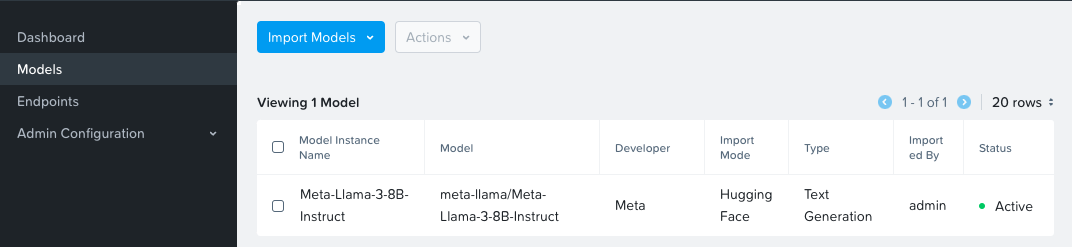
After a successful model import, you will see it in Active status in the NAI UI under Models menu
Create and Test Inference Endpoint
In this section we will create an inference endpoint using the downloaded model.
- Navigate to Inference Endpoints menu and click on Create Endpoint button
-
Fill the following details:
- Endpoint Name:
llama-8b - Model Instance Name:
Meta-LLaMA-8B-Instruct - Use GPUs for running the models :
Checked - No of GPUs (per instance):
- GPU Card:
NVIDIA-L40S(or other available GPU) - No of Instances:
1 - API Keys: Create a new API key or use an existing one
- Endpoint Name:
-
Click on Create
-
Monitor the
nai-adminnamespace to check if the services are coming up -
Check the events in the
nai-adminnamespace for resource usage to make sure all$ kubectl get events -n nai-admin --sort-by='.lastTimestamp' | awk '{print $1, $3, $5}' 110s FinalizerUpdate Updated 110s FinalizerUpdate Updated 110s RevisionReady Revision 110s ConfigurationReady Configuration 110s LatestReadyUpdate LatestReadyRevisionName 110s Created Created 110s Created Created 110s Created Created 110s InferenceServiceReady InferenceService 110s Created Created -
Once the services are running, check the status of the inference service
Troubleshooting Endpoint ISVC
TGI Imange and Self-signed Certificates
Only follow this procedure if this isvc is not starting up.
KNative Serving Image Tag Checking
From testing, we have identified that KServe module is making sure that there are no container image tag discrepencies, by pulling image using SHA digest. This is done to avoid pulling images that are updated without updating the tag.
We have avoided this behavior by patching the config-deployment config map in the knative-serving namespace to skip image tag checking. Check this Prepare for NAI Deployment sectionfor more details.
kubectl patch configmap config-deployment -n knative-serving --type merge -p '{"data":{"registries-skipping-tag-resolving":"${REGISTRY}"}'
If this procedure was not followed, then the isvc will not start up.
-
If the
isvcis not coming up, then explore the events innai-adminnamespace.$ kubectl get isvc NAME URL READY PREV LATEST PREVROLLEDOUTREVISION LATESTREADYREVISION AGE llama8b http://llama8b.nai-admin.svc.cluster.local False $ kubectl get events --sort-by='.lastTimestamp' Warning InternalError revision/llama8b-predictor-00001 Unable to fetch image "harbor.10.x.x.134.nip.io/nkp/nutanix/nai-tgi:2.3.1-825f39d": failed to resolve image to digest: Get "https://harbor.10.x.x.134.nip.io/v2/": tls: failed to verify certificate: x509: certificate signed by unknown authorityThe temporary workaround is to use the TGI images SHA signature from the container registry.
This site will be updated with resolutions for the above issues in the future.
-
Note the above TGI image SHA digest from the container registry.
docker pull harbor.10.x.x.134.nip.io/nkp/nutanix/nai-tgi:2.3.1-825f39d 2.3.1-825f39d: Pulling from nkp/nutanix/nai-tgi Digest: sha256:2df9fab2cf86ab54c2e42959f23e6cfc5f2822a014d7105369aa6ddd0de33006 Status: Image is up to date for harbor.10.x.x.134.nip.io/nkp/nutanix/nai-tgi:2.3.1-825f39d harbor.10.x.x.134.nip.io/nkp/nutanix/nai-tgi:2.3.1-825f39d -
The SHA digest will look like the following:
-
Create a copy of the
isvcmanifest -
Edit the
isvc -
Search and replace the
7. After replacing the image's SHA digest, the image value should look as follows:imagetag with the SHA digest from the TGI image. -
Save the
isvcconfiguration by writing the changes to the file and exiting the vi editor using:wq!key combination. -
Verify that the
isvcis running
This should resolve the issue the issue with the TGI image.
Report Other Issues
If you are facing any other issues, please report them here in the NAI LLM GitHub Repo Issues page.