Deploy and Test App
In this section of the lab we will do the following:
- Deploy a Postgres DB on a VM and configure
- Deploy a front end network tester app on
nkpflowcluster which we deployed in the previous section - Run a few performance and network tests from the front end app's UI
- Implement a network policy and check how the communication between pods can be restricted
Warning
These are tests just to show case Flow CNI's capability in a test environment.
For production environments, use Nutanix database, Flow CNI, and HCI Nutanix Validated Design (NVD) directions.
App Design
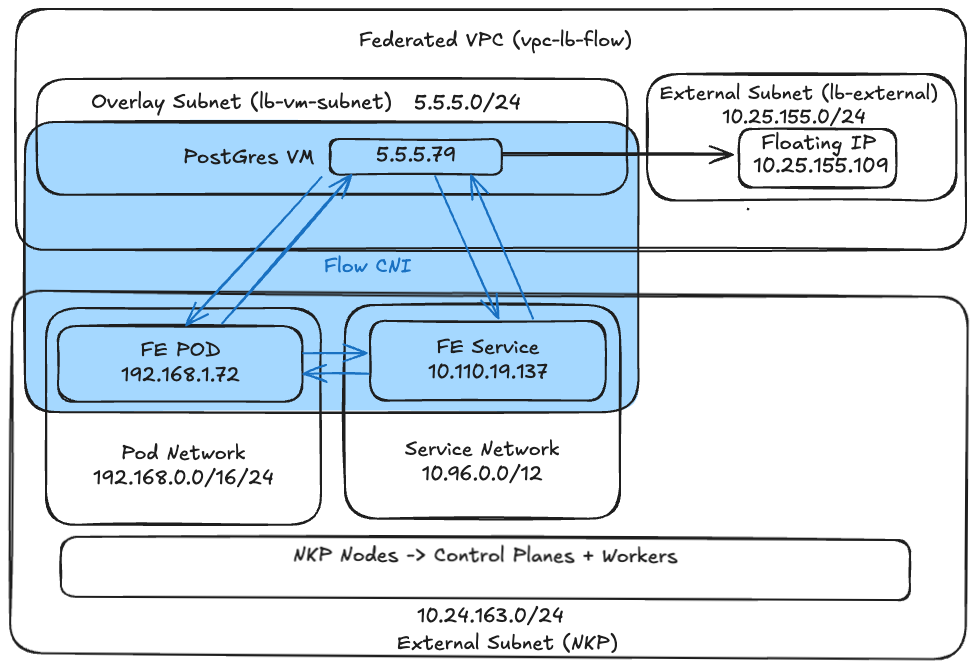
Deploy Postgres DB VM
- In Prism Central go to Compute > VM
-
Create a Postgres VM with the following attributes
- Name:
pg-test-vm - VM Properties:
- CPUs -
6vCPU - Cores per CPU -
1 - Memory -
8GB
- CPUs -
- Attach Disk:
- Operation - clone from image
- Image -
Ubuntu-24.04-server-cloudimg-amd64.img - Click on Save
- Attach to Subnet
- Subnet:
lb-vm-subnet(VPC Internal only subnet created in the previous section) - Assignment Type: Assign with DHCP
- Click on Save
- Subnet:
- Guest Customization:
- Script Type: Cloud-init (Linux)
-
Use the following sample cloud-init
#cloud-config
hostname: pg-test-vm                   # << Change to your pg vm >>
package_update: true
package_upgrade: true
package_reboot_if_required: true
packages:
  - open-iscsi
  - nfs-common
  - git
  - jq
  - bind-utils
  - nmap
  - docker.io
users:
  - default
  - name: ubuntu
    groups: sudo
    shell: /bin/bash
    sudo:
      - 'ALL=(ALL) NOPASSWD:ALL'
    lock_passwd: false
    shell: /bin/bash
    ssh-authorized-keys:
    - ssh-rsa AAAAB3xxxxxxxxxxx     # << Change to your ssh public key >>
runcmd:
  - systemctl stop ufw && systemctl disable ufw
  - eject
  - reboot
- Name:
-
Obtain an Floating IP for the VM in Prism Central > Network & Security and Floating IPs
-
Click on Request Floating IP
- External subnet: -
lb-external - Number of Floating IPs: -
1 - Select Assign Floating IPs
- Choose the
pg-test-vmVM - Click on Save
- External subnet: -
-
Login to the VM using SSH (get IP address from Prism Central)
-
Configure Postgres
-
Edit the main config file to listen on all interfaces.
-
Find
#listen_addresses = 'localhost'and change it to: -
Whitelist the NKP Pod Network: Edit the client authentication file.
Add your cluster's Pod CIDR (e.g.,
10.24.0.0/16) to the bottom of the file: -
Restart PostgreSQL:
-
Run these commands sequentially to set up the
pgbenchenvironment: Create the Database, User, and Permissions:sudo -u postgres psql -c "CREATE DATABASE pgbench_test;" sudo -u postgres psql -c "CREATE USER tester WITH PASSWORD 'testpassword';" sudo -u postgres psql -c "GRANT ALL PRIVILEGES ON DATABASE pgbench_test TO tester;" # Crucial: Grant schema permissions inside the test database for PG 15+ sudo -u postgres psql -d pgbench_test -c "GRANT ALL ON SCHEMA public TO tester;"
Deploy the Frontend App to NKP
Now we will deploy the testing UI to your Kubernetes cluster.
-
From the jumphost VM set kubernetes context to
nkpflowNKP cluster (created in the previous sections) -
Apply the
ConfigMap: -
Apply the
DeploymentandService:
Access and Run Tests
Pods to VM Tests
-
Get the name of front end pod
-
Set environment variables for VM IP and pod name
-
Run network test using
$ kubectl exec -it ${POD_NAME} -- curl -N "http://localhost:8080/test/network?ip=${PG_VM_IP}" data: Starting process... data: Command: iperf3 -c 10.24.155.109 data: Connecting to host 10.24.155.109, port 5201 data: [ 5] local 192.168.1.72 port 34684 connected to 10.24.155.109 port 5201 data: [ ID] Interval Transfer Bitrate Retr Cwnd data: [ 5] 0.00-1.00 sec 538 MBytes 4.51 Gbits/sec 474 673 KBytes data: [ 5] 1.00-2.00 sec 541 MBytes 4.54 Gbits/sec 279 627 KBytes data: [ 5] 2.00-3.00 sec 539 MBytes 4.52 Gbits/sec 72 866 KBytes data: [ 5] 3.00-4.00 sec 545 MBytes 4.57 Gbits/sec 104 957 KBytes data: [ 5] 4.00-5.00 sec 542 MBytes 4.55 Gbits/sec 150 562 KBytes data: [ 5] 5.00-6.00 sec 540 MBytes 4.53 Gbits/sec 368 678 KBytes data: [ 5] 6.00-7.00 sec 544 MBytes 4.56 Gbits/sec 270 652 KBytes data: [ 5] 7.00-8.00 sec 542 MBytes 4.55 Gbits/sec 3 1.05 MBytes data: [ 5] 8.00-9.00 sec 545 MBytes 4.57 Gbits/sec 164 748 KBytes data: [ 5] 9.00-10.00 sec 545 MBytes 4.57 Gbits/sec 178 758 KBytes data: - - - - - - - - - - - - - - - - - - - - - - - - - data: [ ID] Interval Transfer Bitrate Retr data: [ 5] 0.00-10.00 sec 5.29 GBytes 4.55 Gbits/sec 2062 sender data: [ 5] 0.00-10.00 sec 5.29 GBytes 4.54 Gbits/sec receiver data: data: iperf Done. data: Exit code: 0 data: [DONE] -
Run a DB initialise test
data: Starting process... data: Command: pgbench -i -s 50 -h 10.24.155.109 -U tester -d pgbench_test data: dropping old tables... data: creating tables... data: generating data (client-side)... < Snipped for brevity> data: 100000 of 5000000 tuples (2%) done (elapsed 0.01 s, remaining 0.65 s) data: 4500000 of 5000000 tuples (90%) done (elapsed 4.66 s, remaining 0.52 s) data: 4600000 of 5000000 tuples (92%) done (elapsed 4.75 s, remaining 0.41 s) data: 4700000 of 5000000 tuples (94%) done (elapsed 4.82 s, remaining 0.31 s) data: 4800000 of 5000000 tuples (96%) done (elapsed 4.89 s, remaining 0.20 s) data: 4900000 of 5000000 tuples (98%) done (elapsed 4.97 s, remaining 0.10 s) data: 5000000 of 5000000 tuples (100%) done (elapsed 5.06 s, remaining 0.00 s) data: vacuuming... data: creating primary keys... data: done in 6.95 s (drop tables 0.11 s, create tables 0.01 s, client-side generate 5.18 s, vacuum 0.15 s, primary keys 1.49 s). data: Exit code: 0 data: [DONE] -
Run a DB load test from the pod. The test will run for approximately
2 minutesdata: Starting process... data: Command: pgbench -c 5 -j 2 -T 30 -P 1 -h 10.24.155.109 -U tester -d pgbench_test data: pgbench (15.18 (Debian 15.18-0+deb12u1), server 16.14 (Ubuntu 16.14-0ubuntu0.24.04.1)) data: pgbench: pghost: 10.24.155.109 pgport: 5432 nclients: 5 duration: 30 dbName: pgbench_test data: starting vacuum...end. < Snipped for brevity> data: pgbench: client 0 executing script "<builtin: TPC-B (sort of)>" data: scaling factor: 50 data: query mode: simple data: number of clients: 5 data: number of threads: 2 data: maximum number of tries: 1 data: duration: 30 s data: number of transactions actually processed: 27635 data: number of failed transactions: 0 (0.000%) data: latency average = 5.763 ms data: latency stddev = 108.880 ms data: initial connection time = 48.826 ms data: tps = 851.217054 (without initial connection time) data: Exit code: 0 data: [DONE]
VM to Pod Tests
-
Get pod's IP address from the Jumphost using
nkpflowworkload cluster's kubeconfig file$ kubectl get svc --kubeconfig=nkpflow.conf # NAME TYPE CLUSTER-IP EXTERNAL-IP PORT(S) AGE kubernetes ClusterIP 10.96.0.1 <none> 443/TCP 6d23h network-tester-svc ClusterIP 10.110.19.137 <none> 80/TCP 4d1h nginx-service ClusterIP 10.111.215.28 <none> 80/TCP 6d18h # $ kubectl get po -o wide --kubeconfig=nkpflow.conf # NAME READY STATUS RESTARTS AGE IP NODE NOMINATED NODE READINESS GATES flow-ovn-ic-7d6c5bdc87-pcxk7 1/1 Running 0 7h 10.24.163.48 flow-zfck9-57vxk <none> <none> network-tester-8688b44dd7-9bqvt 1/1 Running 0 16h 192.168.1.72 flow-md-0-4v9w6-b26pn-vbqwv <none> <none> -
Login to the VM using SSH (using exernal floating IP)
-
Set environment variables for fron end service ip within the PG VM
-
Run curl command to test in the application is running on the front end pods and to check connectivity
$ curl 10.110.19.137 # <!DOCTYPE html> <html> <head> <title>NKP Network & DB Tester</title> <style> body { font-family: sans-serif; margin: 20px; background: #f4f4f9; } .container { max-width: 900px; margin: auto; background: white; padding: 20px; border-radius: 8px; box-shadow: 0 4px 6px rgba(0,0,0,0.1); } .controls { display:flex; gap:10px; margin-bottom:15px; flex-wrap:wrap; align-items:center; } button { padding:10px 15px; cursor:pointer; background:#0056b3; color:white; border:none; border-radius:4px; font-weight:bold; } button:hover { background:#003d82; } .btn-danger { background:#dc3545; } .btn-danger:hover { background:#a71d2a; } input { padding:8px; border:1px solid #ccc; border-radius:4px; } #console { background:#1e1e1e; color:#00ff00; padding:15px; height:500px; overflow-y:auto; font-family:monospace; border-radius:4px; white-space:pre-wrap; } </style> </head> <body> <div class="container"> <h2>NKP to Nutanix VM Tester</h2> <Snipped for brevity> -
Run curl command to test in the application is running on the front end pods (instead of service) and to check connectivity
Flow CNI allows connectivity between VM, Pods and Services.
Observe Metrics in Prism Central
- Login to the Prism Central UI
- Go to Compute > VMs > Click the
pg-test-vmVM -
Go to Metrics and observe storage and network related graphs
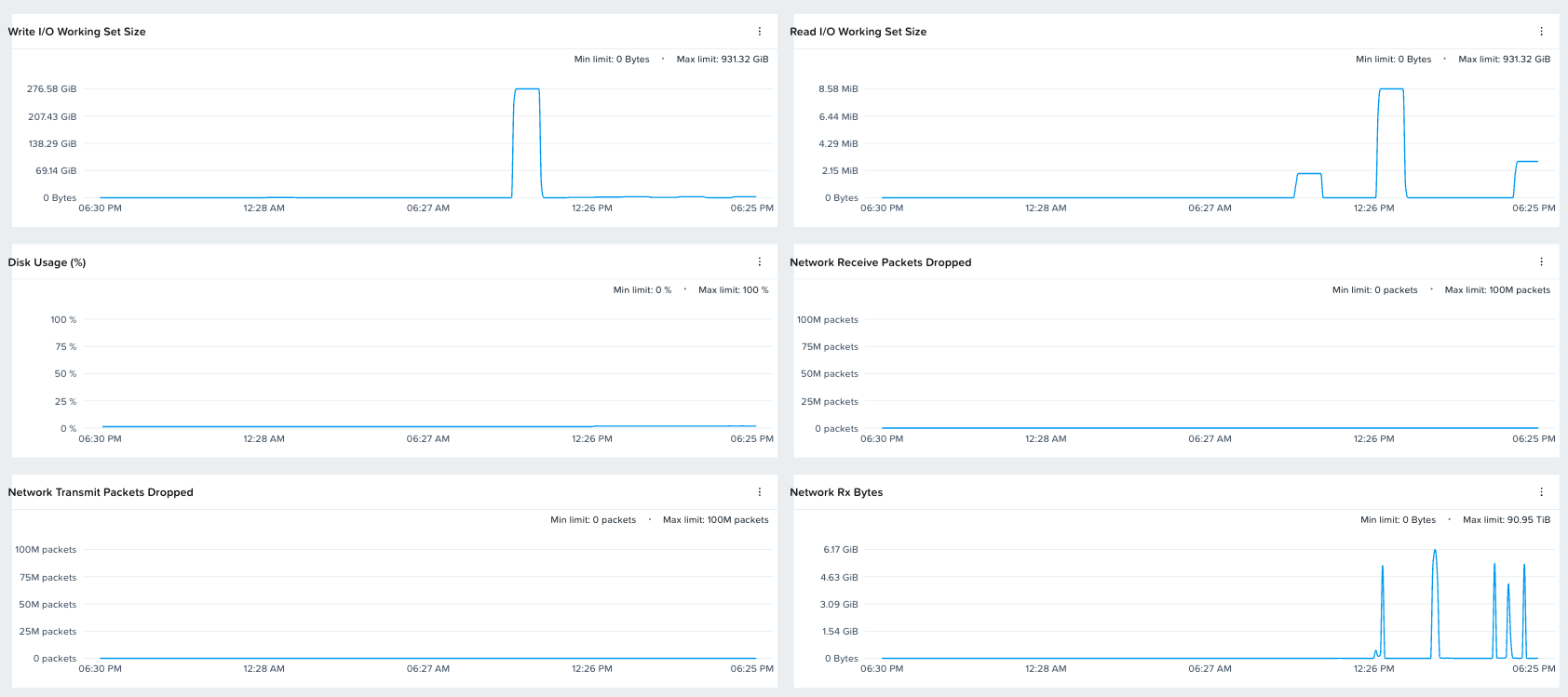
-
Go to Network > Virtual Private Clouds
- Choose
vpc-lb-flowand go to Metrics - Check the Ingress and Egress metrics
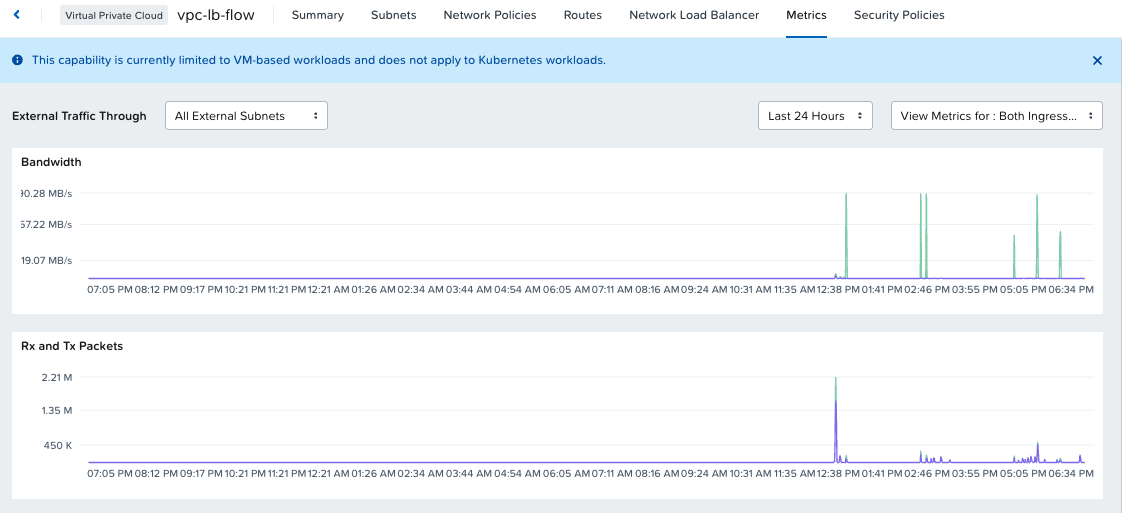
You now have a fully functional, repeatable testing harness to measure Nutanix Flow performance between your Kubernetes pods and your external infrastructure.
Flow CNI - Network Policy Tests
Pod to Pod Traffic Blocking
We will define kubernetes network policy to restrict tranffic between pods
-
Deploy a nginx container
-
Create a network policy to prevent all traffic outgoing traffic in network tester pod
kubectl apply -f -<<EOF apiVersion: networking.k8s.io/v1 kind: NetworkPolicy metadata: name: restrict-tester-egress namespace: default spec: podSelector: matchLabels: app: network-tester policyTypes: - Egress egress: - to: - podSelector: matchExpressions: - key: app operator: NotIn values: - nginx EOF -
Set environment variables for nginx pod IP
-
Login to network tester pod and test connection to nginx pod
-
Login to nginx pod and test connection to network test pod
$ kubectl exec -it nginx-pod -- curl 192.168.1.72:8080
#
<!DOCTYPE html>
<html>
<head>
    <title>NKP Network & DB Tester</title>
    <style>
        body { font-family: sans-serif; margin: 20px; background: #f4f4f9; }
        .container { max-width: 900px; margin: auto; background: white; padding: 20px;
                    border-radius: 8px; box-shadow: 0 4px 6px rgba(0,0,0,0.1); }
        .controls { display:flex; gap:10px; margin-bottom:15px; flex-wrap:wrap; align-items:center; }
        button { padding:10px 15px; cursor:pointer; background:#0056b3; color:white;
                border:none; border-radius:4px; font-weight:bold; }
        button:hover { background:#003d82; }
        .btn-danger { background:#dc3545; }
        .btn-danger:hover { background:#a71d2a; }
        input { padding:8px; border:1px solid #ccc; border-radius:4px; }
        #console { background:#1e1e1e; color:#00ff00; padding:15px; height:500px;
                overflow-y:auto; font-family:monospace; border-radius:4px;
                white-space:pre-wrap; }
    </style>
</head>
<body>
<div class="container">
<h2>NKP to Nutanix VM Tester</h2>

<Snipped for brevity>
We have successfully tested Flow CNI functionality with NKP (kubernetes) level network policies.